Email Cover Letter Example: What Goes in the Message and the Attachment?
Follow the vacancy’s submission instructions to decide whether your email carries the covering letter or simply introduces attached documents. Use the example and checklist to prepare one consistent, checked application package.
Start with the required application package
By Rafal from cver.work
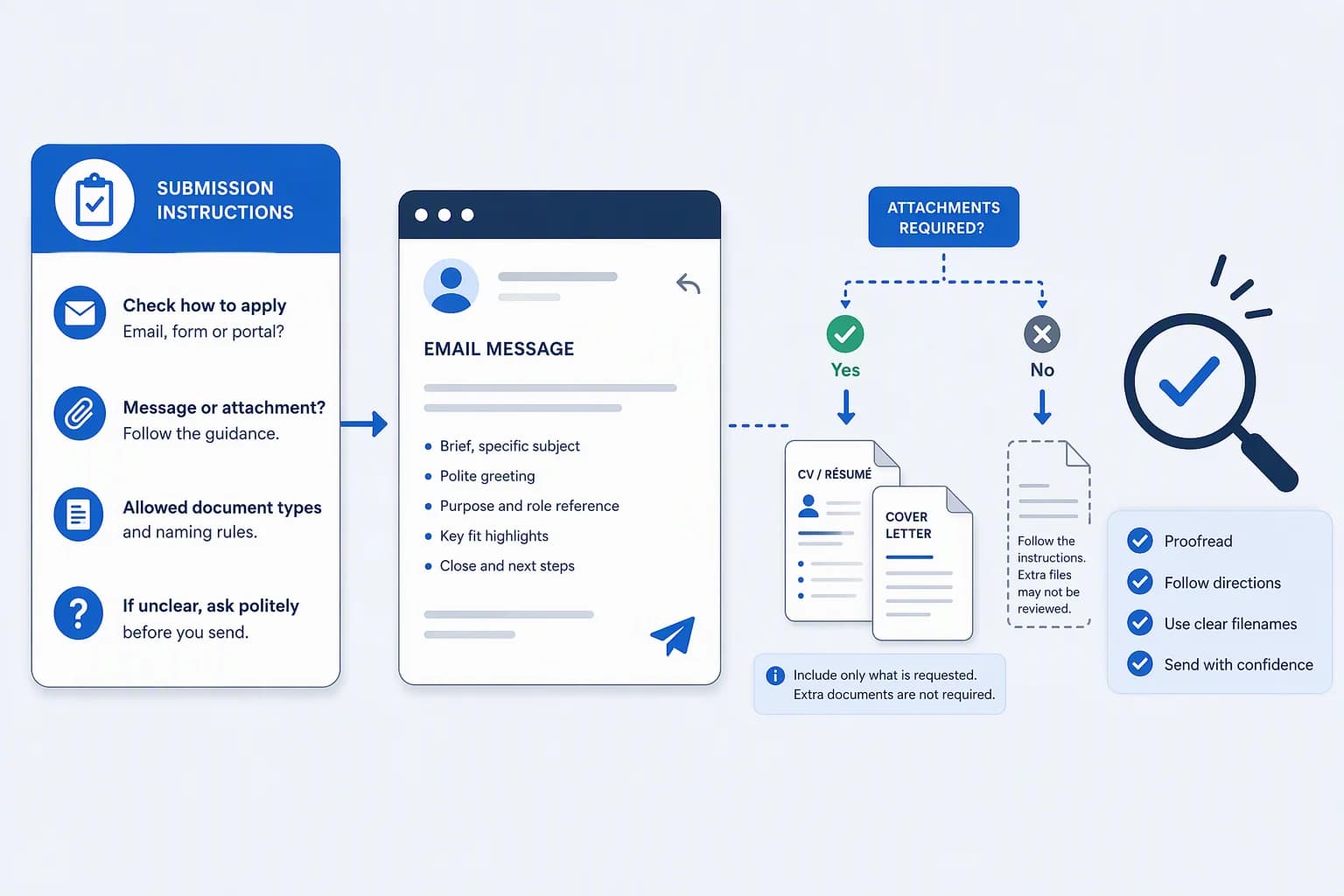
The vacancy’s submission instructions determine the package. If the employer asks for the covering letter in the email body, put it there and attach the requested documents. If separate CV and letter files are requested, attach them and write a short accompanying message. If a portal is required, use that channel instead.
A short message saying what you are sending is not the same as a covering letter explaining your suitability. You do not need to repeat the full letter in both places unless the instructions call for it. Your goal is one checked message and the correct documents, not the most elaborate email.
1. Extract the submission instructions first
St. Olaf College’s US careers guidance recommends checking how to submit the application, whether documents belong in attachments or the email body, and which file types are permitted. Start with those questions rather than a generic template. See its guide to delivering a covering letter.
Copy the relevant instructions into this worksheet. Record “not stated” where the advert is silent; do not fill missing requirements with assumptions.
| Field | What to record |
|---|---|
| Submission channel | Email, portal or another specified route |
| Recipient | The exact address or contact supplied by the employer |
| Subject or reference | Any prescribed subject, role title or vacancy code |
| Requested documents | CV/resume, covering letter and any other named materials |
| Body placement | Short accompanying message, covering letter or application documents |
| Accepted file types | The formats explicitly permitted or required |
| Stated limits | Any actual file-size, document-count or other submission limits |
| Unresolved question | A requirement you need clarified before proceeding |
Check the vacancy-specific subject and requirements
Read the vacancy-specific instructions as well as the general careers page. For example, Manhattan Theatre Club’s lighting vacancy prescribed a subject consisting of “Basic Crew Stage One”, a space, an en dash, another space and “Lighting” in the instructions retrieved on October 4, 2026. Copy the exact subject from the vacancy, including its punctuation; do not substitute a hyphen or a generic subject such as “Job application”. See the employer’s listed-job application requirements.
If an unclear requirement could change how you submit, ask the employer to clarify it. This guide to questions that help clarify the recruitment process can help you keep that conversation focused.
2. Decide what goes in the body and attachments
There is no single body-versus-attachment rule in the guidance examined. St. Olaf recommends attaching both documents when instructions are silent; the University of Kent recommends putting the covering letter in the body and attaching the CV. These are different university recommendations, not evidence of US-wide or UK-wide employer preferences. Compare St. Olaf’s attachment-based advice with Kent’s body-letter advice.
Use the following table to match the package to the situation. Rows labelled hypothetical contain invented instructions, not observed employer requirements.
| Instruction or situation | Email body | Attachments or submission action | Evidence/status |
|---|---|---|---|
| Covering letter in the body, CV attached | Your covering letter | Attach the CV in a permitted format | Documented approach in Kent’s careers guidance; follow contrary employer instructions |
| “Email your CV and a separate covering letter as two PDFs” | Short message identifying the application and both files | Attach two PDFs: CV and covering letter | Hypothetical instruction used in the example below |
| “Email your CV only” | Short message identifying the role and attached CV | Attach only the requested CV | Hypothetical instruction; do not add a separate letter to this package |
| “Applications must be submitted through our portal” | No substitute application email | Submit through the required portal | Hypothetical instruction; an email does not replace this route |
| Placement or format remains unclear | Decide after checking or clarifying the requirement | Do not treat either university default as mandatory | St. Olaf offers contacting the organisation when unsure; Kent’s default differs |
| Manhattan Theatre Club’s listed-job instructions prefer plain-text application documents in the body | Put the covering letter and resume in the body as plain text to follow that preference | MS Word or Adobe PDF are accepted alternatives; the employer states other attachment types will not be opened | Observed US employer instructions in Work With Us, retrieved October 4, 2026 |
Keep market and document terminology in context
The sources examined concern US and UK careers guidance and named employers. They do not establish a rule for every English-speaking market. The US sources use “resume” and “cover letter”; the UK sources use “CV” and “covering letter”. Follow the document labels in your actual application.
3. A complete hypothetical application email
Example assumptions: A fictional vacancy says: “Email your CV and a separate covering letter as two PDFs. Use subject QA-104 - Junior QA Analyst.” Its fictional recipient is recruitment@example.com.
All names, addresses, instructions, role details and filenames below are invented. This is not an application to Manhattan Theatre Club or Prism Infosec, and it reports no real candidate experience.
Make the attachment wording true
The attachment list describes the two files required by this hypothetical scenario. The sentence “Please find attached” is accurate only after those files have actually been selected in the outgoing message. Copying the sentence does not attach anything.
Why each part is there
Check each part against the fictional instruction before adapting it.
This short accompanying-message approach is consistent with St. Olaf’s recommendation to introduce yourself, identify the attached documents and include a greeting and closing in an attachment-based email. See its email delivery guidance.
- Recipient: It matches the fictional instruction. Replace it with the employer’s actual supplied address.
- Subject: It reproduces the prescribed “QA-104 - Junior QA Analyst” exactly, rather than adding a different subject template.
- Short message: It identifies the application and documents. It is not the full covering letter because this vacancy requests that letter as a separate file.
- Attachment wording: “My CV and covering letter” matches the stated two-file package. Change the wording if the required package changes.
- Closing and contact: Replace the invented name and email address with your details, then check them against your documents.
If the letter belongs in the body instead
For a different hypothetical vacancy saying “Put your covering letter in the email body and attach your CV”, use your covering letter as the message. Include any required subject, greeting and closing; attach the CV, and mention only that attachment. Do not retain a sentence claiming that a separate covering-letter file is attached when it is not.
This changes the placement, not the facts or argument in your letter. Keep the body text simple, with short, spaced paragraphs, as Kent’s guidance recommends.
4. Name and inspect the actual files
Including the name, document type and vacancy reference in filenames is an organisation aid, not a verified recruiter preference or an acceptance requirement. Use a prescribed naming convention if the employer supplies one.
Open the exact exports you intend to select. Confirm that they contain the right candidate details, role reference and intended content. Check that they are the versions you reviewed, not an older download with a similar name, and that their actual format follows the instructions.
A real technology-sector example illustrates why format instructions matter: Prism Infosec’s careers page requests a CV and covering letter in PDF format and offers email or a form as submission routes. The retrieved instructions do not specify whether the PDFs should be separate or combined. See Prism Infosec’s application instructions, retrieved October 4, 2026. This is a named employer’s request, not evidence that PDF is universally superior or that every technology application needs two files.
For content and export checks beyond this packaging task, use the guide to checking the exact CV file you will submit.
Illustrative filenames for the hypothetical package
For the two-PDF example, the illustrative filenames are:
- Alex-Morgan-CV-QA-104.pdf
- Alex-Morgan-Cover-Letter-QA-104.pdf
5. Check the final send copy
Use this checklist against the outgoing message and its selected files:
- I have checked the current vacancy instructions, not just a saved template.
- I am using the required submission channel.
- The recipient matches the employer’s supplied details.
- The subject follows any prescribed wording and reference.
- The role title and vacancy code are accurate throughout.
- The body is either the requested covering letter or an appropriate accompanying message.
- Every attachment mentioned is actually selected, and no required document is missing.
- The selected files use the requested formats and comply with any stated limits.
- I have opened the selected versions and checked their contents.
- My contact details are correct in the message and documents.
- I have proofread the final text and removed material left over from another application.
Use a self-test for checking, not as a delivery guarantee
St. Olaf recommends proofreading and sending yourself a test email with the attachments, then checking the displayed text and opening the files. See its proofreading and self-test advice.
A self-test checks that test copy. It does not guarantee delivery to the employer, identical rendering on their device or a response. As a practical precaution, inspect the final selections again if you change the message or documents after testing.
Keep the final decision simple
The final decision is straightforward: follow the current instructions, make the message match the package, and check what you are actually sending.
Source dates and context
The employer examples reflect instructions retrieved on October 4, 2026. Check the current vacancy before sending. Source dates below are observed page metadata, not evidence that particular submission instructions changed on those dates.
St. Olaf College: publication metadata is October 2, 2017; observed modification metadata is July 29, 2024. The modification date does not establish when the application instructions changed. Accessed on October 4, 2026.
University of Kent: publication and update dates are unknown. Accessed on October 4, 2026.
Manhattan Theatre Club: page publication metadata is August 1, 2019; observed page modification metadata is September 2, 2026. Neither is established as the lighting vacancy’s publication date or an instruction-change date. Accessed on October 4, 2026.
Prism Infosec: publication metadata is July 1, 2025; modification metadata is March 25, 2026. Those dates do not identify which instructions changed. Accessed on October 4, 2026.
Common questions
Should I repeat the full letter in the body and as an attachment?
Not automatically. Put it where the instructions request it. A short accompanying message can identify an attached letter without repeating it. If both placements are explicitly required, provide both.
What if the employer asks only for a CV?
For an instruction explicitly saying “CV only”, send that document with a short accompanying message. Do not describe a covering letter as attached or add one merely because an example includes it. If the wording is unclear about additional documents, clarify it.
Should I combine the CV and covering letter?
Combine them if the employer asks for one document; keep them separate if separate files are requested. Where the arrangement is not specified, do not invent a requirement. Prism Infosec’s retrieved PDF request, for example, does not settle that question.
Sources and further reading
- How do you deliver your cover letter?St. Olaf College, Piper Center for Vocation and Career · Accessed
- Cover lettersUniversity of Kent, Careers and Employability Service · Accessed
- Work With UsManhattan Theatre Club · Accessed
- CareersPrism Infosec · Accessed